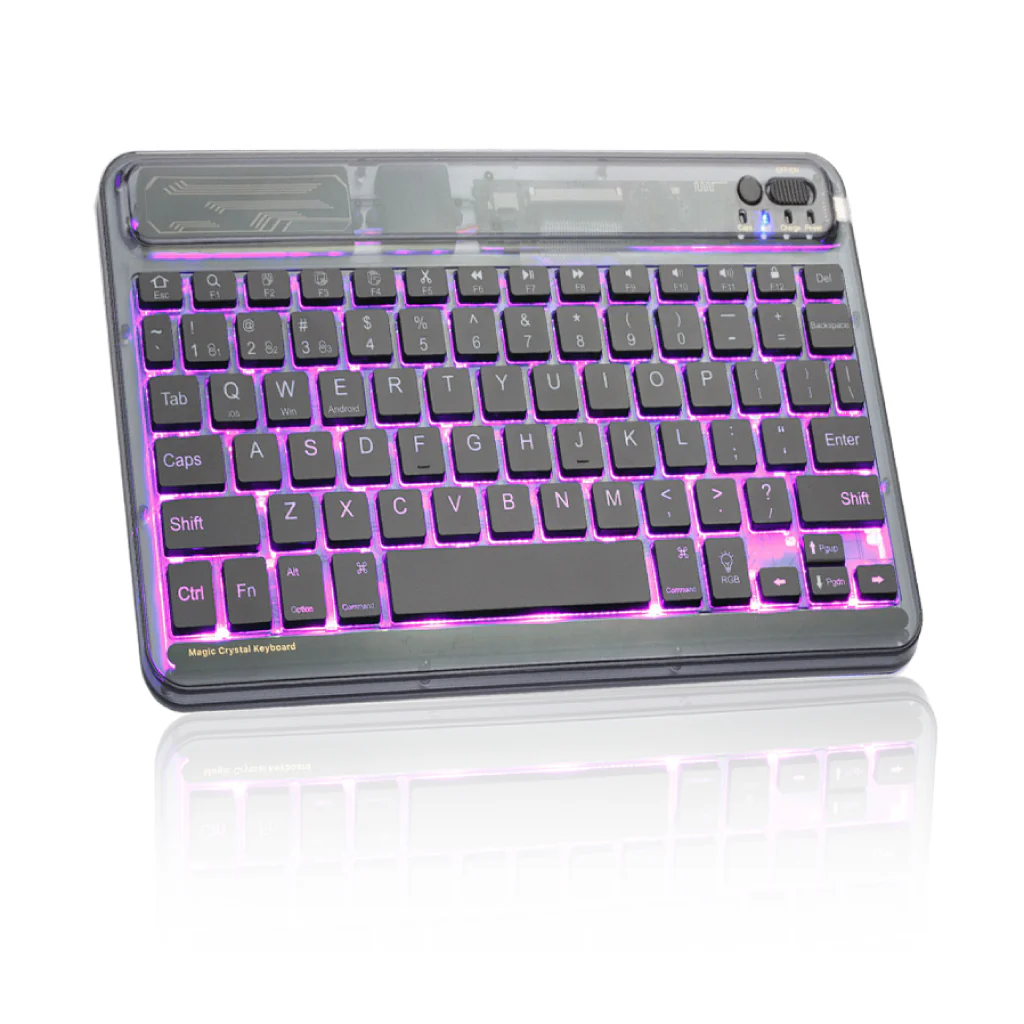
TECPHILE - XK030D Wireless Keyboard with Backlit
MULTI-DEVICE CONNECTION
This Keyboard can Connect up to three devices and switch between them. Easy-Switch lets you type on your laptop or computer, and then keep typing on your phone or tablet- all with the touch of a button.

7 COLORS BACKLIT
7 colors back-light make typing fun and easy in the dark/night. 7 Elegant LED backlight (deep blue, soft blue, bright green, red, yellow, purple) and auto sleep feature to maximize power and typing that much more enjoyable and awesome to look at. You can change the colors through RGB button and theme through bulb Button.


LONG BATTERY LIFE
Built-in Rechargeable battery could extend the battery life, 2-3 hours full charge, work for more than 100 hours, stand by for 180 days. The keyboard will enter into sleep mode if it doesn't work for 10 minutes, and it will disconnect with your iPad. It will wake up and connect to your tab again when pressing any key.


TYPE C CHARGING PORT
XK030D wireless keyboard uses USB Type-C charging port. It is compatible with most chargers and cables out there and can be charged quickly.

AUTO SLEEP/WAKE FUNCTION
XK030D keyboard will enter into sleep mode if it doesn't work for few minutes, and it will disconnect with your device. It will wake up and connect to your tab again when pressing any key. This process will save more battery and you can use it for more days.
DISCLAIMER: Kindly charge the keyboard with a 5V/1 Amp power adapter only. It will improve the life span of your gear and its batteries.


EASY & COMFORTABLE TYPING WITH SCISSOR SWITCHES
XK030D uses a miniature version of high-quality scissor switches. They offer a durable, comfortable typing experience with perfect typing feedback and precise, accurate keystroke registration. The typing feedback is smooth and silent, there is no noisy clicking sound with the XK030D.


HOW TO CONNECT & SWITCH SYSTEM MODE
1. Turn on the keyboard power: Keep Pressing the keyboard power button for 3 seconds. (Charge light shows red and turns on for 3 seconds, then turns off)
2. Press and hold the button for 3 Seconds. The Pair light shows blue and keeps flashing to show keyboard is in pairing mode.
3. Navigate to ‘Bluetooth’ settings and turn on Bluetooth.
4. Select ‘Refresh’ from the settings bar. Your keyboard (Yebos keyboard) will show in the ‘Available Devices’ section.
5. This keyboard could connect three devices, follow the above steps to connect device.
6. Press and hold “Fn+1” for three seconds, the indicator light will flash and device 1 can be connected.
7. Press and hold” Fn+2” for three seconds, the indicator light will flash, and device 2 can be connected.
8. Press and hold “Fn+3” for three seconds, the indicator light will flash and device 3 can be connected.

Original: $1,499.00
-65%$1,499.00
$524.65Product Information
Product Information
Shipping & Returns
Shipping & Returns
Description
MULTI-DEVICE CONNECTION
This Keyboard can Connect up to three devices and switch between them. Easy-Switch lets you type on your laptop or computer, and then keep typing on your phone or tablet- all with the touch of a button.
7 COLORS BACKLIT
7 colors back-light make typing fun and easy in the dark/night. 7 Elegant LED backlight (deep blue, soft blue, bright green, red, yellow, purple) and auto sleep feature to maximize power and typing that much more enjoyable and awesome to look at. You can change the colors through RGB button and theme through bulb Button.
LONG BATTERY LIFE
Built-in Rechargeable battery could extend the battery life, 2-3 hours full charge, work for more than 100 hours, stand by for 180 days. The keyboard will enter into sleep mode if it doesn't work for 10 minutes, and it will disconnect with your iPad. It will wake up and connect to your tab again when pressing any key.
TYPE C CHARGING PORT
XK030D wireless keyboard uses USB Type-C charging port. It is compatible with most chargers and cables out there and can be charged quickly.
AUTO SLEEP/WAKE FUNCTION
XK030D keyboard will enter into sleep mode if it doesn't work for few minutes, and it will disconnect with your device. It will wake up and connect to your tab again when pressing any key. This process will save more battery and you can use it for more days.
DISCLAIMER: Kindly charge the keyboard with a 5V/1 Amp power adapter only. It will improve the life span of your gear and its batteries.
EASY & COMFORTABLE TYPING WITH SCISSOR SWITCHES
XK030D uses a miniature version of high-quality scissor switches. They offer a durable, comfortable typing experience with perfect typing feedback and precise, accurate keystroke registration. The typing feedback is smooth and silent, there is no noisy clicking sound with the XK030D.
HOW TO CONNECT & SWITCH SYSTEM MODE
1. Turn on the keyboard power: Keep Pressing the keyboard power button for 3 seconds. (Charge light shows red and turns on for 3 seconds, then turns off)
2. Press and hold the button for 3 Seconds. The Pair light shows blue and keeps flashing to show keyboard is in pairing mode.
3. Navigate to ‘Bluetooth’ settings and turn on Bluetooth.
4. Select ‘Refresh’ from the settings bar. Your keyboard (Yebos keyboard) will show in the ‘Available Devices’ section.
5. This keyboard could connect three devices, follow the above steps to connect device.
6. Press and hold “Fn+1” for three seconds, the indicator light will flash and device 1 can be connected.
7. Press and hold” Fn+2” for three seconds, the indicator light will flash, and device 2 can be connected.
8. Press and hold “Fn+3” for three seconds, the indicator light will flash and device 3 can be connected.