TECPHILE - PS-P610D Wireless Keyboard Case for Samsung Tab S6 Lite
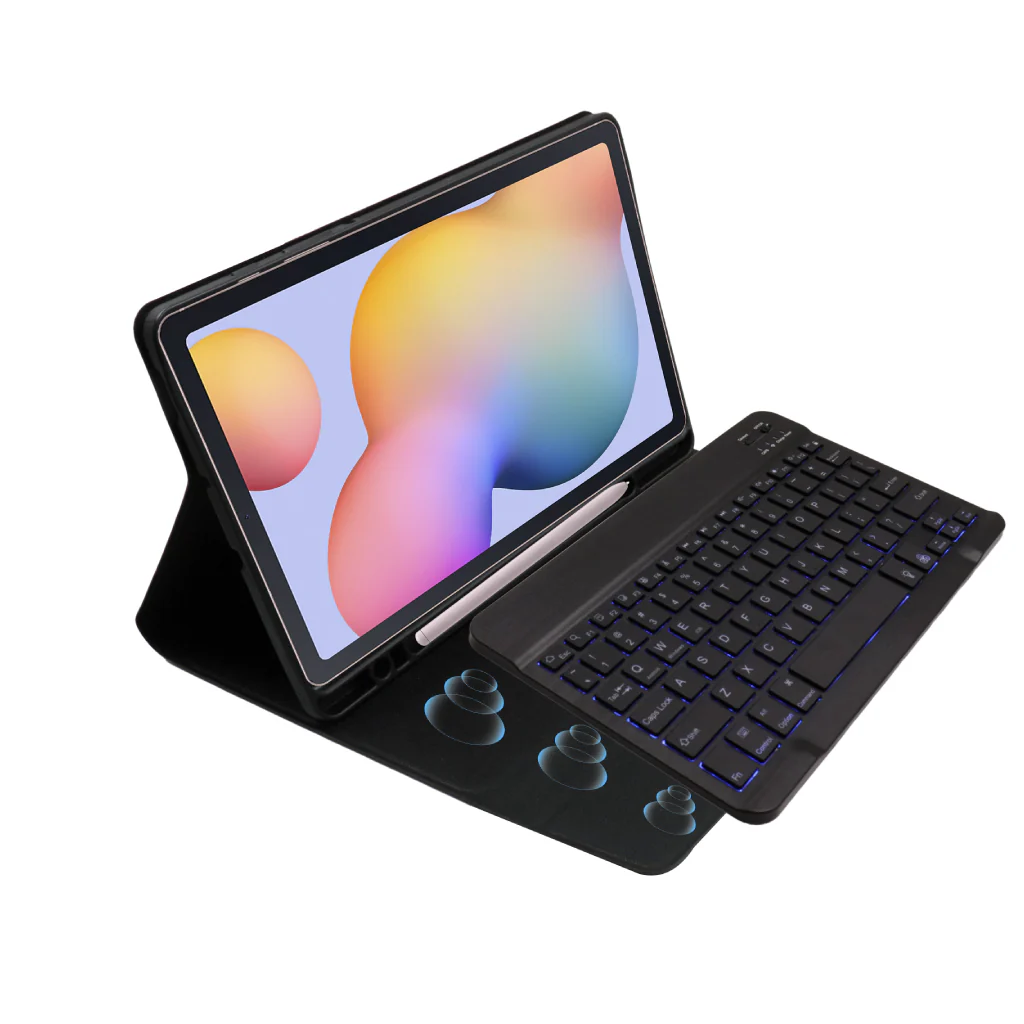
CASE COMPATIBILITY: Wireless keyboard case is specially designed for full compatibility with Samsung Tab S6 Lite 10.4” (2022) SM-P613, SM-P619, Samsung Tab S6 Lite 10.4” (2020) SM-P610N, SM-P615, SM-P610, models. It is not compatible with any other model.
BRIGHT RGB COLOR BACKLIT: Slim keyboard has 7 Elegant RGB backlights (deep blue, soft blue, bright green, white, red, yellow, pink) with 2 different modes that allows you to work at night. It makes typing fun and easy in the dark/night.
HOLDER FOR PENCIL: This portable keyboard case has separate pencil section. The special designed Pen slot will protect your Pen more carefully from rolling or missing.
SOLID-RELIABLE PROTECTION: Protected keyboard case is made using durable soft plastic and leatherette material. The case protects your tab from accidental fall damage and also allows you to carry it around easily. Magnetic base keyboard allows you to work from anywhere. PS-P610D is super lightweight and easy to carry. It’s sleek form factor allows you to easily carry it around in your backpack and use it on the go.
EXTENDED BATTERY LIFE: PS-P610D keyboard features an in-built 500mAh battery. Use your keyboard for long hours on a single charge. It provides a battery life of up to 100 hours with a single charge and a standby time of up to 100days. The keyboard also features a sleep/wake-up function that preserves its battery life when not in use. Wireless keyboard case uses Micro USB charging port. It is compatible with most chargers and cables out there and can be charged quickly.
DISCLAIMER: Kindly charge the keyboard with a 5V/1 Amp power adapter only. It will improve the life span of your gear and its batteries.
HOW TO CONNECT
- Step 1: Before first use, we recommend charging the keyboard for a minimum of 2 to 3 hours.
- Step 2: Please press ‘Fn + C’ Keys to start pairing on the Keyboard. The Blue light will start blinking on the keyboard to show keyboard is in pairing mode.
- Step 3: On your source device, select the ‘Settings’ icon.
- Step 4: Navigate to ‘Bluetooth’ settings and turn on Bluetooth.
- Step 5: Select ‘Refresh’ from the settings bar. Your keyboard (Bluetooth Keyboard) will show in the ‘Available Devices’ section.
- Step 6: Select the keyboard and press Pair or hit enter. You are now connected!
Original: $1,990.00
-65%$1,990.00
$696.50Product Information
Product Information
Shipping & Returns
Shipping & Returns
Description
CASE COMPATIBILITY: Wireless keyboard case is specially designed for full compatibility with Samsung Tab S6 Lite 10.4” (2022) SM-P613, SM-P619, Samsung Tab S6 Lite 10.4” (2020) SM-P610N, SM-P615, SM-P610, models. It is not compatible with any other model.
BRIGHT RGB COLOR BACKLIT: Slim keyboard has 7 Elegant RGB backlights (deep blue, soft blue, bright green, white, red, yellow, pink) with 2 different modes that allows you to work at night. It makes typing fun and easy in the dark/night.
HOLDER FOR PENCIL: This portable keyboard case has separate pencil section. The special designed Pen slot will protect your Pen more carefully from rolling or missing.
SOLID-RELIABLE PROTECTION: Protected keyboard case is made using durable soft plastic and leatherette material. The case protects your tab from accidental fall damage and also allows you to carry it around easily. Magnetic base keyboard allows you to work from anywhere. PS-P610D is super lightweight and easy to carry. It’s sleek form factor allows you to easily carry it around in your backpack and use it on the go.
EXTENDED BATTERY LIFE: PS-P610D keyboard features an in-built 500mAh battery. Use your keyboard for long hours on a single charge. It provides a battery life of up to 100 hours with a single charge and a standby time of up to 100days. The keyboard also features a sleep/wake-up function that preserves its battery life when not in use. Wireless keyboard case uses Micro USB charging port. It is compatible with most chargers and cables out there and can be charged quickly.
DISCLAIMER: Kindly charge the keyboard with a 5V/1 Amp power adapter only. It will improve the life span of your gear and its batteries.
HOW TO CONNECT
- Step 1: Before first use, we recommend charging the keyboard for a minimum of 2 to 3 hours.
- Step 2: Please press ‘Fn + C’ Keys to start pairing on the Keyboard. The Blue light will start blinking on the keyboard to show keyboard is in pairing mode.
- Step 3: On your source device, select the ‘Settings’ icon.
- Step 4: Navigate to ‘Bluetooth’ settings and turn on Bluetooth.
- Step 5: Select ‘Refresh’ from the settings bar. Your keyboard (Bluetooth Keyboard) will show in the ‘Available Devices’ section.
- Step 6: Select the keyboard and press Pair or hit enter. You are now connected!