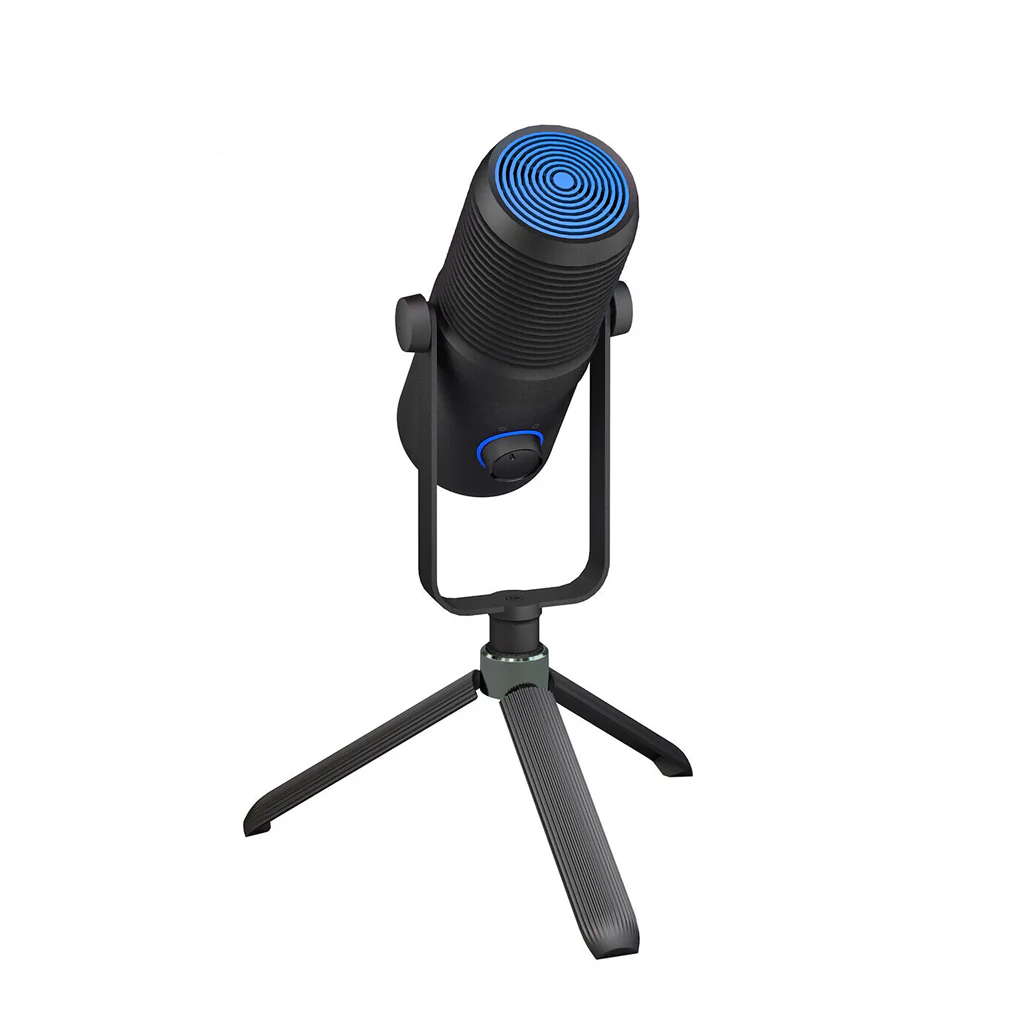
Star G wave - Professional Condenser USB Microphone Kit (Unboxed)
WIDE COMPATIBILITY: This microphone is compatible with both MAC and Windows systems, making it suitable for a range of occasions, such as professional audio recording, radio broadcasting, and live streaming on Mac (macOS 10.10 or higher), PS4, and various devices such as PCs (windows 7, 8, 10), laptops, and Android or iPhone (with a conversion plug).
PLUG AND PLAY: This microphone is designed with a plug-and-play feature, making it effortless to install and use with the included USB cable. It doesn't require phantom power or an adapter, making it even more convenient. The USB cable is also long enough to accommodate most PC setups, allowing you to begin recording and streaming right away.
IMPROVED DESIGN: The adjustable KNOB control and mute button on the podcast USB mic are simple to use and conveniently located, with an LED indicator to indicate their status. Additionally, the microphone includes a headphone jack, which allows you to monitor your voice in real-time, mixed with the sound from your computer. This feature enables you to instantly listen to your recordings and ensure that your streams sound great.
ADJUSTABLE ARM STAND: The microphone is mounted on a cantilever bracket, which allows for stable and secure placement. Moreover, the bracket enables all-directional angle adjustment, ensuring that the microphone can be positioned according to your needs.
ADJUSTABLE POP FILTER: The adjustable pop filter comes with a screw rotating clamp that features a scratch-proof gripper and mat, providing a user-friendly and effortless mounting and demounting experience. This feature allows you to easily adjust the position of the pop filter to suit your needs, while also protecting your equipment from scratches and other forms of damage.
SHOCK MOUNT HOLDER: The shock mount included with the microphone is designed to effectively reduce vibrations caused by vibrato, ensuring that the recorded sound is more appropriate and realistic. This feature is particularly useful for recording vocals or instruments with significant movements, as it prevents unwanted vibrations from affecting the recording quality.
CARDIOID PICKUP PATTERN: features a cardioid pickup pattern, which effectively minimizes background noise and isolates the main sound source. This means that the microphone primarily captures sound from the front and sides, while reducing sound from the rear, resulting in clear and focused recordings. This feature makes it ideal for use in noisy environments or where unwanted background noise is a concern.
Use ME3 on your PC (windows 7-8.1 or 10)
- Connect to the PC using the attached USB cable.
- From the start menu, select control panel.
- From the control panel, select the sound icon
- On the record tab, right-click ME3 and select properties. 5. On the Level Tab, choose the appropriate volume (first positioned at the middle of the slider area, then left or right) or adjust the volume directly on the microphone.
Use ME3 on the Mac (macOS 10.10 or later)
- Connect to Mac
- using the attached USB cable. Open system preferences and select the sound icon
- Click on the input tab and hover ME3
- Set the input volume to the appropriate level. sub microphones are highly sensitive and may require a very low volume setting.
Original: $1,999.00
-65%$1,999.00
$699.65Product Information
Product Information
Shipping & Returns
Shipping & Returns
Description
WIDE COMPATIBILITY: This microphone is compatible with both MAC and Windows systems, making it suitable for a range of occasions, such as professional audio recording, radio broadcasting, and live streaming on Mac (macOS 10.10 or higher), PS4, and various devices such as PCs (windows 7, 8, 10), laptops, and Android or iPhone (with a conversion plug).
PLUG AND PLAY: This microphone is designed with a plug-and-play feature, making it effortless to install and use with the included USB cable. It doesn't require phantom power or an adapter, making it even more convenient. The USB cable is also long enough to accommodate most PC setups, allowing you to begin recording and streaming right away.
IMPROVED DESIGN: The adjustable KNOB control and mute button on the podcast USB mic are simple to use and conveniently located, with an LED indicator to indicate their status. Additionally, the microphone includes a headphone jack, which allows you to monitor your voice in real-time, mixed with the sound from your computer. This feature enables you to instantly listen to your recordings and ensure that your streams sound great.
ADJUSTABLE ARM STAND: The microphone is mounted on a cantilever bracket, which allows for stable and secure placement. Moreover, the bracket enables all-directional angle adjustment, ensuring that the microphone can be positioned according to your needs.
ADJUSTABLE POP FILTER: The adjustable pop filter comes with a screw rotating clamp that features a scratch-proof gripper and mat, providing a user-friendly and effortless mounting and demounting experience. This feature allows you to easily adjust the position of the pop filter to suit your needs, while also protecting your equipment from scratches and other forms of damage.
SHOCK MOUNT HOLDER: The shock mount included with the microphone is designed to effectively reduce vibrations caused by vibrato, ensuring that the recorded sound is more appropriate and realistic. This feature is particularly useful for recording vocals or instruments with significant movements, as it prevents unwanted vibrations from affecting the recording quality.
CARDIOID PICKUP PATTERN: features a cardioid pickup pattern, which effectively minimizes background noise and isolates the main sound source. This means that the microphone primarily captures sound from the front and sides, while reducing sound from the rear, resulting in clear and focused recordings. This feature makes it ideal for use in noisy environments or where unwanted background noise is a concern.
Use ME3 on your PC (windows 7-8.1 or 10)
- Connect to the PC using the attached USB cable.
- From the start menu, select control panel.
- From the control panel, select the sound icon
- On the record tab, right-click ME3 and select properties. 5. On the Level Tab, choose the appropriate volume (first positioned at the middle of the slider area, then left or right) or adjust the volume directly on the microphone.
Use ME3 on the Mac (macOS 10.10 or later)
- Connect to Mac
- using the attached USB cable. Open system preferences and select the sound icon
- Click on the input tab and hover ME3
- Set the input volume to the appropriate level. sub microphones are highly sensitive and may require a very low volume setting.