OP116T Keyboard Case Cover for OnePlus Pad 11.61 inch 2023
COMPATIBILITY: This flip cover is exclusively designed for OnePlus Pad 11.6 inch Tablet 2023 Case. Note: it will not be compatible with any other model. Please check your tablet model before purchasing.
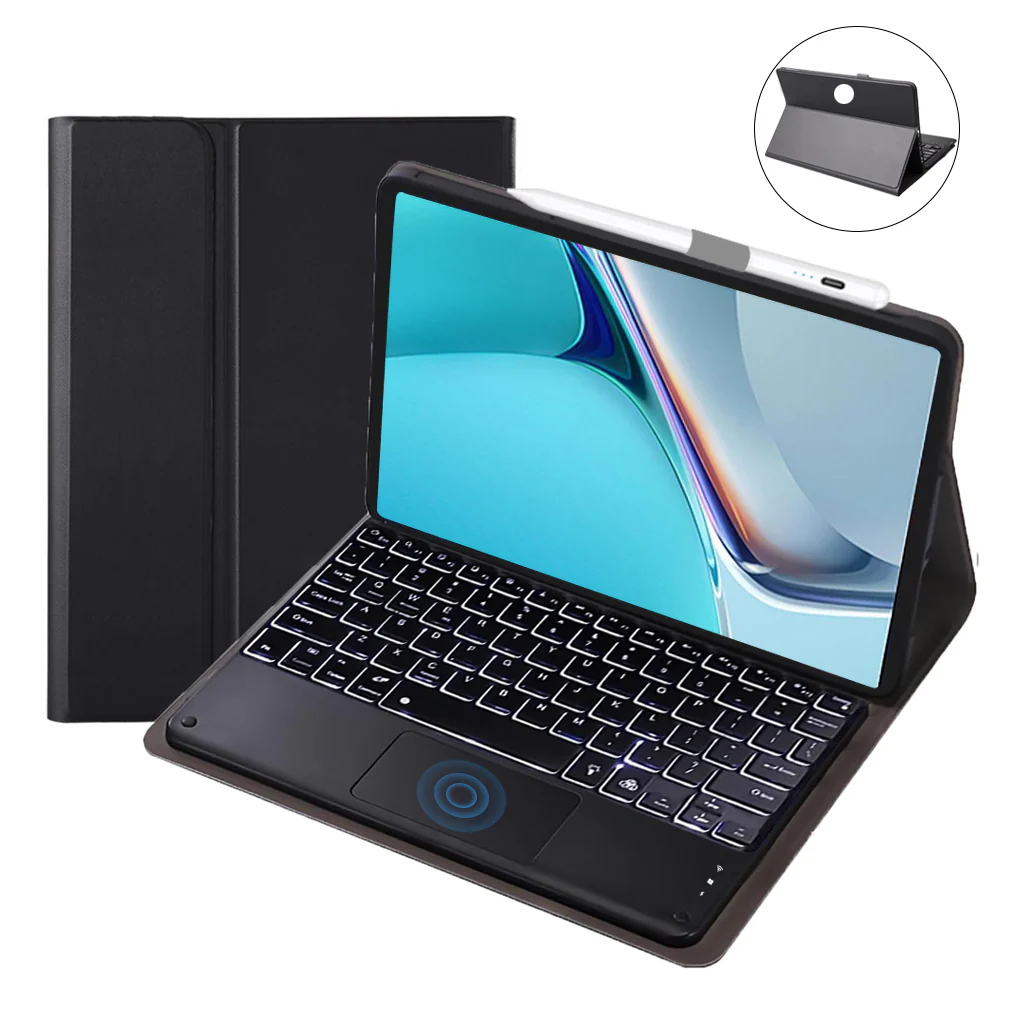
EFFORTLESSLY TRANSFORM YOUR TABLET INTO A LAPTOP: Turn Your OnePlus Pad 11.6 Inch into a Laptop Easily - Just attach your tab to the cover, connect it to the wireless keyboard, and instantly transform it into a laptop. It's quick and keeps you efficient wherever you go traveling or working. Plus, the pen holder design makes it easy to take out or store your pencil, so you won't lose it while on the go. (Pencil not included).
MULTIFUNCTIONAL MULTI-VIEWING ANGLE PROTECTIVE CASE: This versatile case enables you to adjust angles providing multiple viewing angles mode. With adjustable stand options, you can effortlessly type, read, and enjoy multimedia content, enhancing your visual experience and overall usability. Additionally, the convenient design ensures optimal viewing comfort for various activities on your device.
SMART MULTI GESTURE TRACKPAD: Effortlessly scroll, swipe, and perform various actions on your tablet with the built-in multi-gesture trackpad. This feature allows for seamless document editing, web browsing, and presentation creation or any work is effortless with smoother soft keys. Moreover, the palm rejection function automatically deactivates the touchpad while typing on the keyboard, enhancing your productivity and user experience.
ULTIMATE PROTECTION AND CUSTOMIZATION WITH KEYBOARD CASE/COVER: Versatile Keyboard Case/Cover: Enhance the durability of your OnePlus Pad with a Keyboard Case/Cover that provides ultimate protection and customization. This cover features a front PU leather cover and a soft TPU frame, offering complete protection against shocks, drops, and impacts. You can transform this keyboard case into a tri-fold case cover with a detachable keyboard. Additionally, the wireless connectivity of the keyboard enables you to work from anywhere you want.
7-COLOR BACKLIT KEYBOARD, PERFECT FOR LOW-LIGHT ENVIRONMENTS: The case cover for the Lenovo Tab offers an attractive 7-color backlit feature that can be customized to suit your lighting preferences. Easily adjust the brightness settings and select from a range of 7 vibrant colors for the backlight, providing a pleasant typing experience even in dimly lit environments.
PORTABLE, LIGHTWEIGHT, AND HANDY DESIGN: The case is conveniently portable and easy to hold, making it an excellent companion for your business, study, or entertainment needs. it is highly portable and effortless to carry. It can easily fit into a briefcase, handbag, or backpack, ensuring convenient mobility. The keyboard wirelessly connects via Bluetooth. Enhancing the typing experience by incorporating spacious scissor-structure keys, providing a more comfortable feel while typing.
How to connect with Devices
Step 1: Before first use, we recommend charging the keyboard for a minimum of 4 to 6 hours.
Step 2: Please press the ‘Fn + C’ Keys to start pairing on the Keyboard. The blue light will start blinking on the keyboard to show the keyboard is in pairing mode.
Step 3: On your device, select the ‘Settings’ icon.
Step 4: Navigate to ‘Bluetooth’ settings and turn on Bluetooth.
Step 5: Select ‘Refresh’ from the settings bar. Your keyboard (Bluetooth Keyboard) will show in the ‘Available Devices’ section.
Step 6: Select the keyboard and press Pair or hit enter. You are now connected!
Troubleshooting Steps
- Make sure the power is turned on.
- Ensure keyboard operable distance.
- Make sure the battery has power.
- Ensure the device’s Bluetooth is turned on.
- Ensure the wireless keyboard is connected to the Bluetooth.
- Ensure the wireless keyboard is paired successfully.
DISCLAIMER: Kindly use the keyboard with a 5V/1 Amp power adapter only. It will improve the life span of your gear and its batteries.
Product Information
Product Information
Shipping & Returns
Shipping & Returns
Description
COMPATIBILITY: This flip cover is exclusively designed for OnePlus Pad 11.6 inch Tablet 2023 Case. Note: it will not be compatible with any other model. Please check your tablet model before purchasing.
EFFORTLESSLY TRANSFORM YOUR TABLET INTO A LAPTOP: Turn Your OnePlus Pad 11.6 Inch into a Laptop Easily - Just attach your tab to the cover, connect it to the wireless keyboard, and instantly transform it into a laptop. It's quick and keeps you efficient wherever you go traveling or working. Plus, the pen holder design makes it easy to take out or store your pencil, so you won't lose it while on the go. (Pencil not included).
MULTIFUNCTIONAL MULTI-VIEWING ANGLE PROTECTIVE CASE: This versatile case enables you to adjust angles providing multiple viewing angles mode. With adjustable stand options, you can effortlessly type, read, and enjoy multimedia content, enhancing your visual experience and overall usability. Additionally, the convenient design ensures optimal viewing comfort for various activities on your device.
SMART MULTI GESTURE TRACKPAD: Effortlessly scroll, swipe, and perform various actions on your tablet with the built-in multi-gesture trackpad. This feature allows for seamless document editing, web browsing, and presentation creation or any work is effortless with smoother soft keys. Moreover, the palm rejection function automatically deactivates the touchpad while typing on the keyboard, enhancing your productivity and user experience.
ULTIMATE PROTECTION AND CUSTOMIZATION WITH KEYBOARD CASE/COVER: Versatile Keyboard Case/Cover: Enhance the durability of your OnePlus Pad with a Keyboard Case/Cover that provides ultimate protection and customization. This cover features a front PU leather cover and a soft TPU frame, offering complete protection against shocks, drops, and impacts. You can transform this keyboard case into a tri-fold case cover with a detachable keyboard. Additionally, the wireless connectivity of the keyboard enables you to work from anywhere you want.
7-COLOR BACKLIT KEYBOARD, PERFECT FOR LOW-LIGHT ENVIRONMENTS: The case cover for the Lenovo Tab offers an attractive 7-color backlit feature that can be customized to suit your lighting preferences. Easily adjust the brightness settings and select from a range of 7 vibrant colors for the backlight, providing a pleasant typing experience even in dimly lit environments.
PORTABLE, LIGHTWEIGHT, AND HANDY DESIGN: The case is conveniently portable and easy to hold, making it an excellent companion for your business, study, or entertainment needs. it is highly portable and effortless to carry. It can easily fit into a briefcase, handbag, or backpack, ensuring convenient mobility. The keyboard wirelessly connects via Bluetooth. Enhancing the typing experience by incorporating spacious scissor-structure keys, providing a more comfortable feel while typing.
How to connect with Devices
Step 1: Before first use, we recommend charging the keyboard for a minimum of 4 to 6 hours.
Step 2: Please press the ‘Fn + C’ Keys to start pairing on the Keyboard. The blue light will start blinking on the keyboard to show the keyboard is in pairing mode.
Step 3: On your device, select the ‘Settings’ icon.
Step 4: Navigate to ‘Bluetooth’ settings and turn on Bluetooth.
Step 5: Select ‘Refresh’ from the settings bar. Your keyboard (Bluetooth Keyboard) will show in the ‘Available Devices’ section.
Step 6: Select the keyboard and press Pair or hit enter. You are now connected!
Troubleshooting Steps
- Make sure the power is turned on.
- Ensure keyboard operable distance.
- Make sure the battery has power.
- Ensure the device’s Bluetooth is turned on.
- Ensure the wireless keyboard is connected to the Bluetooth.
- Ensure the wireless keyboard is paired successfully.
DISCLAIMER: Kindly use the keyboard with a 5V/1 Amp power adapter only. It will improve the life span of your gear and its batteries.