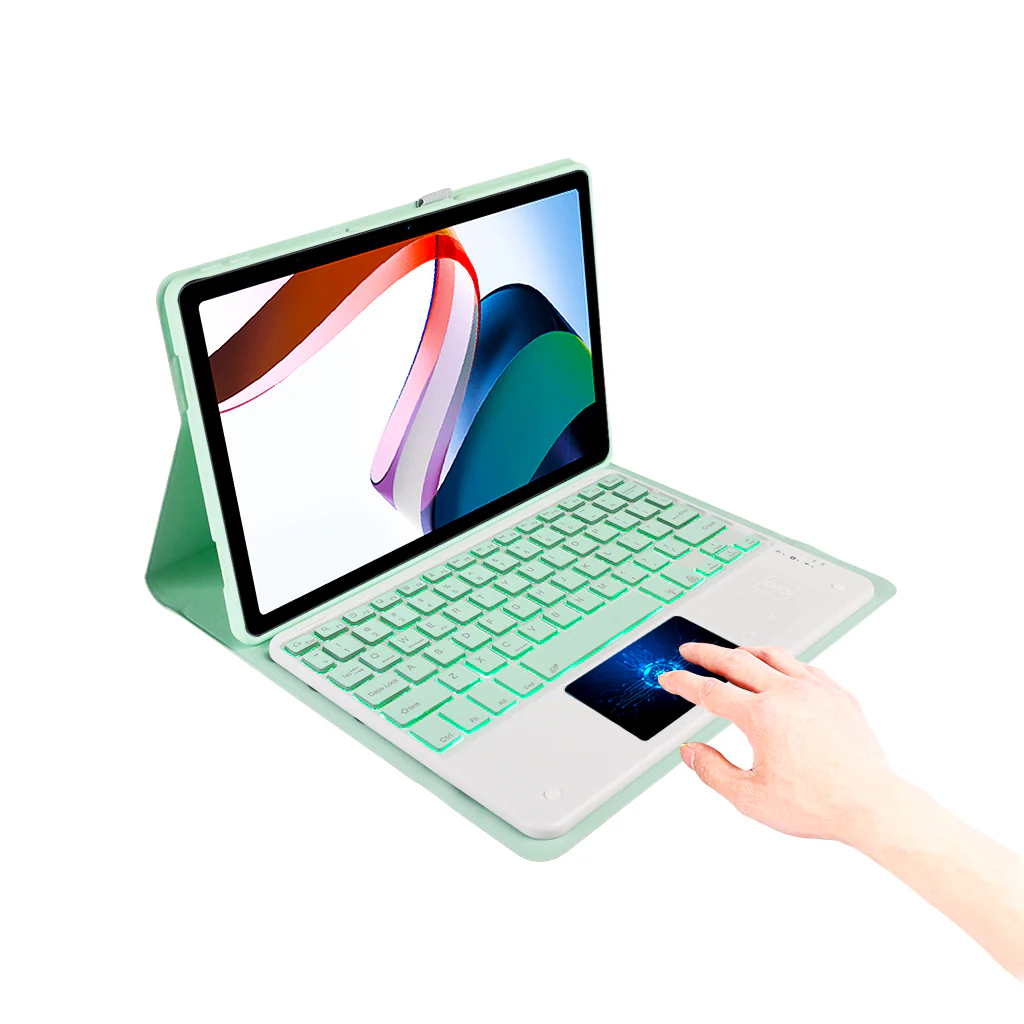
LX11T Keyboard Case for Lenovo Tab P11/ P11 Plus 11 inch
DESIGNED FOR: LX11T Keyboard Case is Compatible Lenovo Tab P11/P11 Plus 11 inch (ZA940124SE, TB-J606F, J606X, J607F). Not compatible with any other devices.
SMART MULTI-GESTURE TRACKPAD: This Keyboard Case for Lenovo Tab is equipped with a smart touchpad, allowing you to navigate your tablet's interface with ease. With multi-finger functionality, it allows you to scroll, swipe, and perform various actions on your tab without the need for a separate mouse. Whether you're browsing, typing, or editing, the keyboard case enhances your tablet experience with the convenience and portability of a modern laptop.
7 COLOR BACKLIT WITH 2 LIGHT MODES: The keyboard case features 7-color backlit that can be adjusted to your environment's lighting needs. You can easily adjust the color by choosing from 7 different colors for the backlight. 2 Color modes ensure a comfortable typing experience even in a dark room. The Keyboard Case for Lenovo Tab also includes shortcuts for functions like adjusting brightness, changing backlight colors, media control, and volume adjustment. These shortcuts make it easier and more efficient to use the keyboard case.
DETACHABLE KEYBOARD & ADJUSTABLE VIEWING ANGLE: Keyboard Case for Lenovo Tab With adjustable angles, this keyboard case seamlessly transforms your tablet into a laptop. Easily detach and secure the keyboard for versatile tablet and laptop modes. It reclines smoothly while maintaining stability, ensuring you can write, draw, watch, play, and work without worrying about your iPad tipping backward.
SEAMLESS BLUETOOTH CONNECTIVITY: You can easily connect your tab to Keyboard case and start typing wirelessly with its Bluetooth connectivity. Say goodbye to tangled cables and enjoy the freedom of wireless connectivity, allowing you to work and type with convenience and flexibility. The keyboard case's reliable 10m stable Bluetooth connection ensures a smooth and uninterrupted typing experience, enhancing your productivity on the go.
TYPE-C CHARGING & PENCIL HOLDER: Pencil Holder & Type-C Charging: Keep your stylus or digital pen secure and accessible with the built-in holder, preventing any risk of loss. The addition of a Type-C charging port ensures fast and efficient charging, compatible with contemporary accessories, simplifying your setup.
SMART WAKE/SLEEP FUNCTION: The Keyboard helps manage power consumption through its intelligent wake/sleep feature. When not in use, your keyboard enters a power-saving sleep mode automatically, saving energy and extending your battery life.
Important Note: For optimal performance and to prolong the life of your gear and its batteries, it is recommended to use the keyboard with a 5V/1 Amp power adapter.
HOW TO CONNECT WITH DEVICES
Step 1: Before first use, we recommend charging the keyboard for a minimum of 4 to 6 hours.
Step 2: Please press ‘Fn + C’ Keys to start pairing on the Keyboard. The blue light will start blinking on the keyboard to show the keyboard is in pairing mode.
Step 3: On your device, select the ‘Settings’ icon.
Step 4: Navigate to ‘Bluetooth’ settings and turn on Bluetooth.
Step 5: Select ‘Refresh’ from the settings bar. Your keyboard (Bluetooth Keyboard) will show in the ‘Available Devices’ section.
Step 6: Select the keyboard and press Pair or hit enter. You are now connected!
TROUBLESHOOTING STEPS
- Make sure the power is turned on.
- Ensure keyboard operable distance.
- Make sure the battery has power.
- Ensure the device’s Bluetooth is turned on.
- Ensure the wireless keyboard is connected with Bluetooth.
- Ensure the wireless keyboard is paired successfully
Original: $1,749.00
-65%$1,749.00
$612.15Product Information
Product Information
Shipping & Returns
Shipping & Returns
Description
DESIGNED FOR: LX11T Keyboard Case is Compatible Lenovo Tab P11/P11 Plus 11 inch (ZA940124SE, TB-J606F, J606X, J607F). Not compatible with any other devices.
SMART MULTI-GESTURE TRACKPAD: This Keyboard Case for Lenovo Tab is equipped with a smart touchpad, allowing you to navigate your tablet's interface with ease. With multi-finger functionality, it allows you to scroll, swipe, and perform various actions on your tab without the need for a separate mouse. Whether you're browsing, typing, or editing, the keyboard case enhances your tablet experience with the convenience and portability of a modern laptop.
7 COLOR BACKLIT WITH 2 LIGHT MODES: The keyboard case features 7-color backlit that can be adjusted to your environment's lighting needs. You can easily adjust the color by choosing from 7 different colors for the backlight. 2 Color modes ensure a comfortable typing experience even in a dark room. The Keyboard Case for Lenovo Tab also includes shortcuts for functions like adjusting brightness, changing backlight colors, media control, and volume adjustment. These shortcuts make it easier and more efficient to use the keyboard case.
DETACHABLE KEYBOARD & ADJUSTABLE VIEWING ANGLE: Keyboard Case for Lenovo Tab With adjustable angles, this keyboard case seamlessly transforms your tablet into a laptop. Easily detach and secure the keyboard for versatile tablet and laptop modes. It reclines smoothly while maintaining stability, ensuring you can write, draw, watch, play, and work without worrying about your iPad tipping backward.
SEAMLESS BLUETOOTH CONNECTIVITY: You can easily connect your tab to Keyboard case and start typing wirelessly with its Bluetooth connectivity. Say goodbye to tangled cables and enjoy the freedom of wireless connectivity, allowing you to work and type with convenience and flexibility. The keyboard case's reliable 10m stable Bluetooth connection ensures a smooth and uninterrupted typing experience, enhancing your productivity on the go.
TYPE-C CHARGING & PENCIL HOLDER: Pencil Holder & Type-C Charging: Keep your stylus or digital pen secure and accessible with the built-in holder, preventing any risk of loss. The addition of a Type-C charging port ensures fast and efficient charging, compatible with contemporary accessories, simplifying your setup.
SMART WAKE/SLEEP FUNCTION: The Keyboard helps manage power consumption through its intelligent wake/sleep feature. When not in use, your keyboard enters a power-saving sleep mode automatically, saving energy and extending your battery life.
Important Note: For optimal performance and to prolong the life of your gear and its batteries, it is recommended to use the keyboard with a 5V/1 Amp power adapter.
HOW TO CONNECT WITH DEVICES
Step 1: Before first use, we recommend charging the keyboard for a minimum of 4 to 6 hours.
Step 2: Please press ‘Fn + C’ Keys to start pairing on the Keyboard. The blue light will start blinking on the keyboard to show the keyboard is in pairing mode.
Step 3: On your device, select the ‘Settings’ icon.
Step 4: Navigate to ‘Bluetooth’ settings and turn on Bluetooth.
Step 5: Select ‘Refresh’ from the settings bar. Your keyboard (Bluetooth Keyboard) will show in the ‘Available Devices’ section.
Step 6: Select the keyboard and press Pair or hit enter. You are now connected!
TROUBLESHOOTING STEPS
- Make sure the power is turned on.
- Ensure keyboard operable distance.
- Make sure the battery has power.
- Ensure the device’s Bluetooth is turned on.
- Ensure the wireless keyboard is connected with Bluetooth.
- Ensure the wireless keyboard is paired successfully