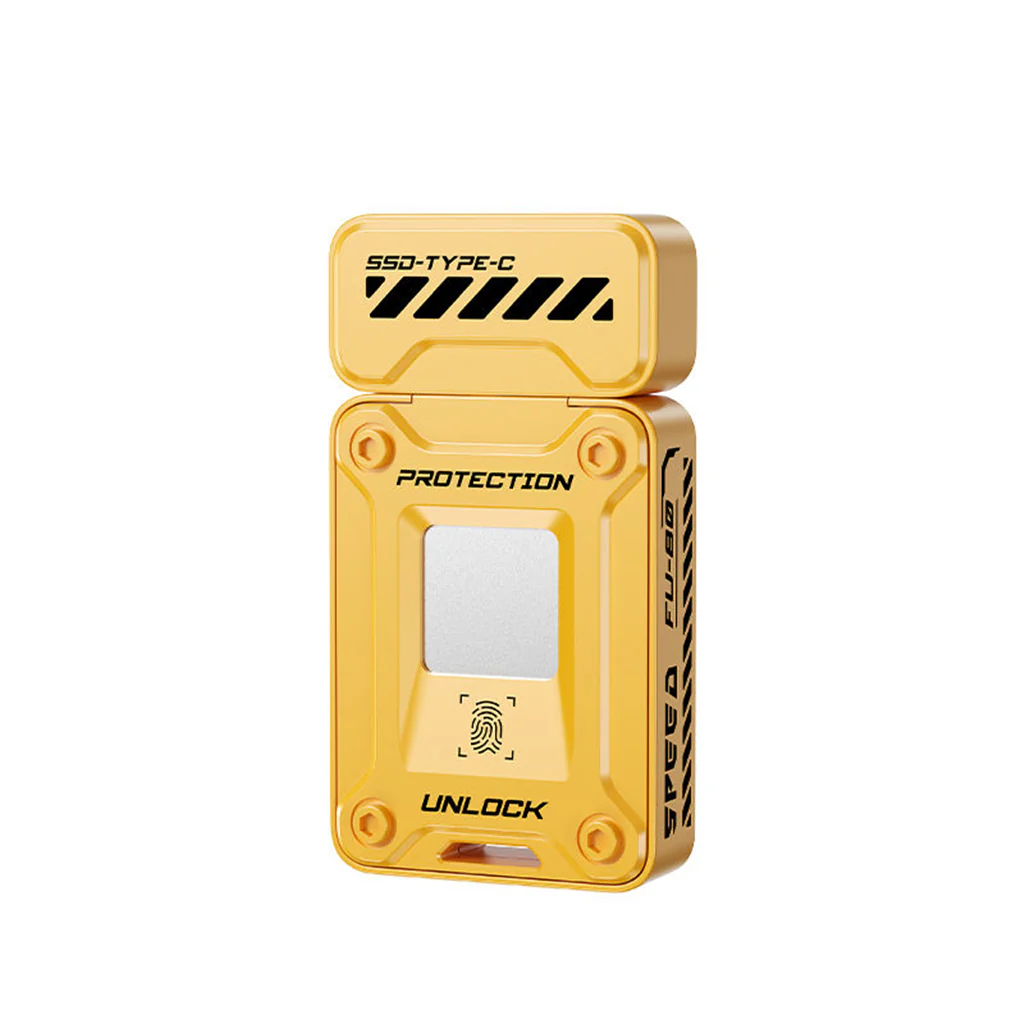
EAGET - FU80 Fingerprint Lock SSD Flash Drive
FINGERPRINT & PASSWORD ENCRYPTION SECURITY: The EAGET FU80 Pen Drive uses an advanced AES256 biometric fingerprint encryption system to keep sensitive files safe. Only authorized users can access the private partition, ensuring maximum data privacy and robust protection from unauthorized access.
DUAL USB CONNECTORS FOR BROAD COMPATIBILITY: This SSD/Pen Drive comes packed with both USB Type-C and USB-A connectors, allowing seamless compatibility with a wide range of devices. You can use this drive on laptops, smartphones, tablets and even desktop computers. Not needing 3rd party adapter
FINGERPRINT & PASSWORD ENCRYPTION SECURITY: EAGET FU80 Pen Drive uses advanced AES256 biometric fingerprint encryption to keep sensitive files safe. Only authorized users can access the private partition, ensuring maximum data privacy and robust protection from unauthorized access.
DUAL USB CONNECTORS FOR BROAD COMPATIBILITY: This SSD/Pen Drive comes packed with both USB Type-C and USB-A connectors, allowing seamless compatibility with a wide range of devices. You can use this drive on laptops, smartphones, tablets and even desktop computers. Not needing 3rd party adapters makes file transfers across different devices convenient and efficient.
SOLID-STATE SPEED: Equipped with USB 3.0/3.2 technology, the FU80 delivers blazing fast data transfer speeds up to 560MB/s. This ensures quick copying and reading of large files like videos, photos and software, significantly reducing wait times during file management.
PARTITIONED STORAGE FOR EXTRA PRIVACY: The FU80 supports partitioning of its storage into public and encrypted sections. Users can customize how much space is allocated for secure encrypted data versus general accessible files. This feature provides flexible data management which an individual may tailor according to their needs.
PREMIUM ZINC ALLOY BUILD QUALITY: The flash drive features a compact and sleek metal body built with durable Zinc Alloy materials that resist wear and tear. Its portable design often includes a lanyard hole or keychain attachment, making it easy to carry and reducing the risk of loss.
HOW TO CONNECT:
-
Connect the FU80 Flash Drive to Your Phone
Plug the EAGET FU80 into the Type-C port of your Android device. -
Locate and Install the APK
Open your phone’s file manager and navigate to the FU80 drive. Find the pre-loaded APK file and tap to install the app. -
Launch the EAGET App
After installation, open the newly-installed app. The app will automatically detect the FU80 flash drive connected to your device. -
Allow Required Permissions
When prompted, grant the app storage and device permissions as requested to ensure smooth operation. -
Set Up Password and Fingerprint
You will be guided to a secure setup screen. Here, set your preferred password and scan your fingerprint for encrypted access. -
Start Using Secure Storage
After setup, all data stored on the FU80 is protected and only accessible via your chosen password or authorized fingerprint.
Original: $3,299.00
-65%$3,299.00
$1,154.65Product Information
Product Information
Shipping & Returns
Shipping & Returns
Description
FINGERPRINT & PASSWORD ENCRYPTION SECURITY: The EAGET FU80 Pen Drive uses an advanced AES256 biometric fingerprint encryption system to keep sensitive files safe. Only authorized users can access the private partition, ensuring maximum data privacy and robust protection from unauthorized access.
DUAL USB CONNECTORS FOR BROAD COMPATIBILITY: This SSD/Pen Drive comes packed with both USB Type-C and USB-A connectors, allowing seamless compatibility with a wide range of devices. You can use this drive on laptops, smartphones, tablets and even desktop computers. Not needing 3rd party adapter
FINGERPRINT & PASSWORD ENCRYPTION SECURITY: EAGET FU80 Pen Drive uses advanced AES256 biometric fingerprint encryption to keep sensitive files safe. Only authorized users can access the private partition, ensuring maximum data privacy and robust protection from unauthorized access.
DUAL USB CONNECTORS FOR BROAD COMPATIBILITY: This SSD/Pen Drive comes packed with both USB Type-C and USB-A connectors, allowing seamless compatibility with a wide range of devices. You can use this drive on laptops, smartphones, tablets and even desktop computers. Not needing 3rd party adapters makes file transfers across different devices convenient and efficient.
SOLID-STATE SPEED: Equipped with USB 3.0/3.2 technology, the FU80 delivers blazing fast data transfer speeds up to 560MB/s. This ensures quick copying and reading of large files like videos, photos and software, significantly reducing wait times during file management.
PARTITIONED STORAGE FOR EXTRA PRIVACY: The FU80 supports partitioning of its storage into public and encrypted sections. Users can customize how much space is allocated for secure encrypted data versus general accessible files. This feature provides flexible data management which an individual may tailor according to their needs.
PREMIUM ZINC ALLOY BUILD QUALITY: The flash drive features a compact and sleek metal body built with durable Zinc Alloy materials that resist wear and tear. Its portable design often includes a lanyard hole or keychain attachment, making it easy to carry and reducing the risk of loss.
HOW TO CONNECT:
-
Connect the FU80 Flash Drive to Your Phone
Plug the EAGET FU80 into the Type-C port of your Android device. -
Locate and Install the APK
Open your phone’s file manager and navigate to the FU80 drive. Find the pre-loaded APK file and tap to install the app. -
Launch the EAGET App
After installation, open the newly-installed app. The app will automatically detect the FU80 flash drive connected to your device. -
Allow Required Permissions
When prompted, grant the app storage and device permissions as requested to ensure smooth operation. -
Set Up Password and Fingerprint
You will be guided to a secure setup screen. Here, set your preferred password and scan your fingerprint for encrypted access. -
Start Using Secure Storage
After setup, all data stored on the FU80 is protected and only accessible via your chosen password or authorized fingerprint.